The software procurement process is the set of steps an organization follows to buy software: confirm the need, check what you already own, choose a product and supplier, review security and legal terms, place the order, then manage use and renewals until the tool is retired. Purchasing is only one step inside it. The shortlist is where most teams lose the most time, and it is where independent, repeatable comparison data helps most. That is the gap VibeVoted fills: it ranks software products using evaluations from 10 distinct leading AI models on seven published criteria, and buyers never pay to read the rankings.
TL;DR
- Procurement covers the whole journey from need to exit. Purchasing is just the moment of placing the order and paying.
- The eProcurement Toolkit describes nine steps, and the review effort should follow risk (what data the tool touches), not price alone.
- Compare every candidate against your own written requirements, not against a feature list or against each other.
- Rankings built on fixed criteria and repeatable evaluations make the shortlist faster and easier to defend.
- Makers who want to be on buyers’ shortlists can prepare a listing and enter a ranked session for $25 one-off per credit.
Table of Contents
- Procurement versus purchasing: what is the difference?
- The nine steps of the software procurement process
- How to compare software fairly
- Where rankings fit into the process
- What a structured process saves
- Measure whether it worked
- For software makers: getting onto buyers’ shortlists
- Get your product ranked on VibeVoted
- FAQ
- Sources
Procurement versus purchasing: what is the difference?
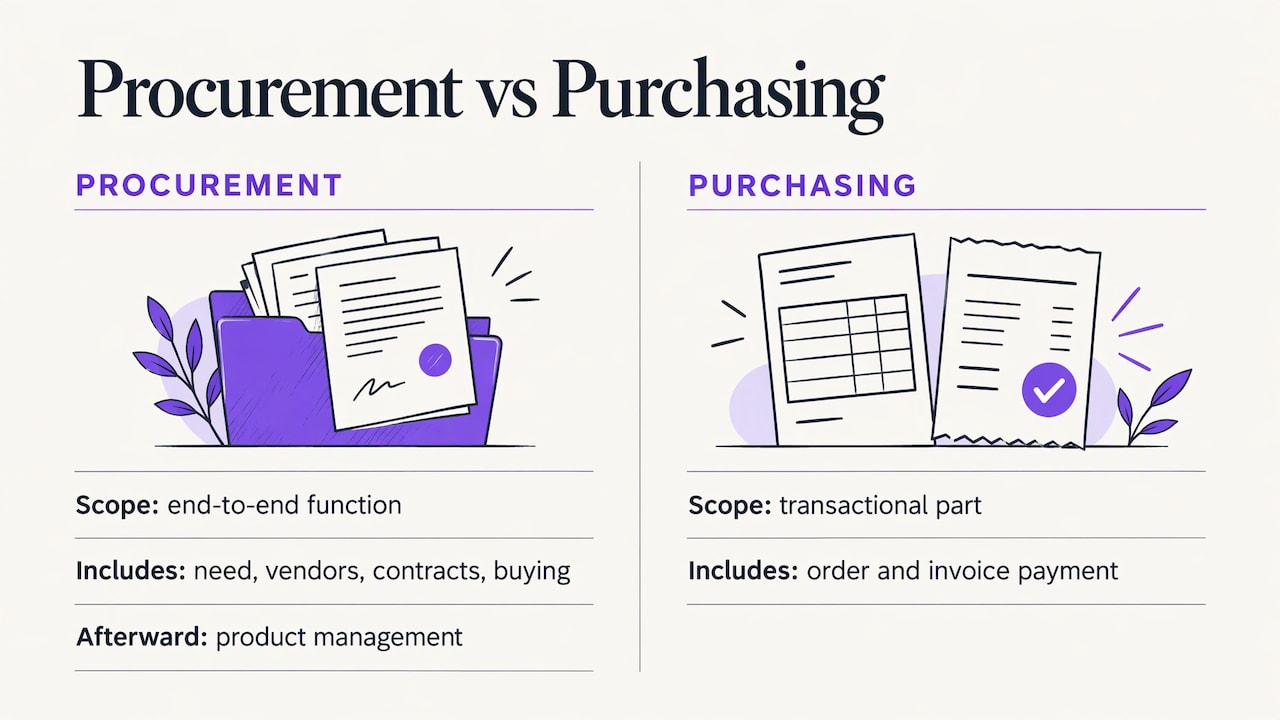
People use the two terms interchangeably, but they cover different ground. Procurement is the end-to-end function: identifying the need, finding vendors, agreeing contract terms, buying, and managing the product afterward. Purchasing is the transactional part: issuing the order and paying the invoice.
For software the distinction matters more than for office supplies. The eProcurement Toolkit notes that SaaS differs from most purchases in four ways. It often stores or reads your organization’s data. It is usually a subscription that renews automatically. It is priced by a licence metric such as named users, devices or usage. And it has to connect to your other systems. Each of those facts creates work long before and long after the payment.
The nine steps of the software procurement process
The nine-step sequence below follows the eProcurement Toolkit’s step-by-step guide, with what each step takes and where it tends to go wrong.
1. Start with a request and a named owner
Every purchase begins with a written request that names a business owner, the problem being solved and who will use the tool. Without an owner, nobody is accountable for adoption or renewal later.
Where it goes wrong: requests that say “we need a better tool” without describing the problem. Write the problem as a sentence you can later test: “Support agents spend four minutes per ticket copying data between systems.” That sentence becomes your yardstick in step 9.
2. Check the licences you already own
Before you evaluate anything new, look at what the organization already pays for. Another team may hold unused seats, or an existing platform may have a module that covers the need. This single check prevents duplicate purchases, one of the problems Najar lists as the reason structured procurement pays off.
3. Sort the request by risk
Not every tool deserves the same scrutiny. The data a tool will hold and the systems it will touch decide the review effort more than the price does: a cheap tool can carry high risk and an expensive one low risk. Sort requests into tiers, for example a team to-do app with no sensitive data versus a customer-data platform with single sign-on.
This is how larger organizations keep procurement from becoming a bottleneck. Ohio State’s technology office launched a Software Preapproval Process in 2026 that routes low-risk software around unnecessary steps and surfaces security, legal and accessibility questions earlier.
4. Choose the route to market
Small, low-value purchases can go through a simple quote. Larger or higher-risk ones justify a request for quotation (RFQ, a price-focused comparison of defined products) or a request for proposal (RFP, a structured questionnaire to suppliers about how they would meet your needs). Match the formality to the stakes.
Where it goes wrong: requirements that exclude good suppliers by accident, such as demanding many years of company history in a market where strong products are young.
5. Review security, privacy and accessibility
This is the step where tools that look identical on a feature page diverge. Ask for current independent security attestations such as a SOC 2 report, confirm where data is stored, and check how you can export it. Regulation sets the floor in some markets: the EU’s GDPR dictates what a data-processor contract must contain, and US federal agencies use FedRAMP.
The network side matters too. If the software will sit on your office network, connect to devices or handle customer data, it helps to understand your own environment first. Guidance on IT network security services covers the infrastructure questions a software security review tends to raise.
6. Agree licence and contract terms
The contract signed in month one governs every invoice that follows. The terms that cost most later are:
- the licence metric (named users, devices or usage)
- price increases at renewal
- automatic renewal and notice periods
- minimum commitments and true-ups (charges when usage exceeds what you bought)
- audit rights
- service levels
- the right to take your data out at exit
Negotiate these while you still have the option of walking away.
7. Approve and order
Approval should match the risk tier from step 3. Purchasing happens here: the order, the purchase order number if your finance team uses one, and the payment. Keep the final scorecard and the signed terms together so the decision can be explained later.
8. Set up and record
Connect single sign-on, assign licences, and record the contract in a register. Tools that are bought and never recorded are the ones that renew unnoticed.
9. Manage use, renewal and exit
Keep one register of every subscription with its owner, licence metric, quantity, price, renewal date and notice deadline. Count back from the notice deadline, not the renewal date, because replacing a system takes far longer than one notice period. At renewal, compare licences paid with licences used, then decide whether to renew, renegotiate, reduce, replace or end. At retirement, take your data out and confirm deletion.
How to compare software fairly
Step 5 and step 6 get the attention, but the choice itself is made in the comparison. A few principles keep it honest.
Write the requirements first. Start with a short must-have list built with finance, product, end users, engineering, IT and compliance. Thoughtworks calls feature-list comparison one of the biggest traps in software evaluation, because teams end up choosing the tool with the most features rather than the best fit.
Use gates, then weights. Treat deal-breakers (required functionality, security attestation, data export, budget) as pass or fail. Then score the survivors on a weighted scale. A simple split might weight functional fit, security, integration, three-year cost and vendor stability. Compare cost over three years, not on the headline price, and include implementation, training and integration work.
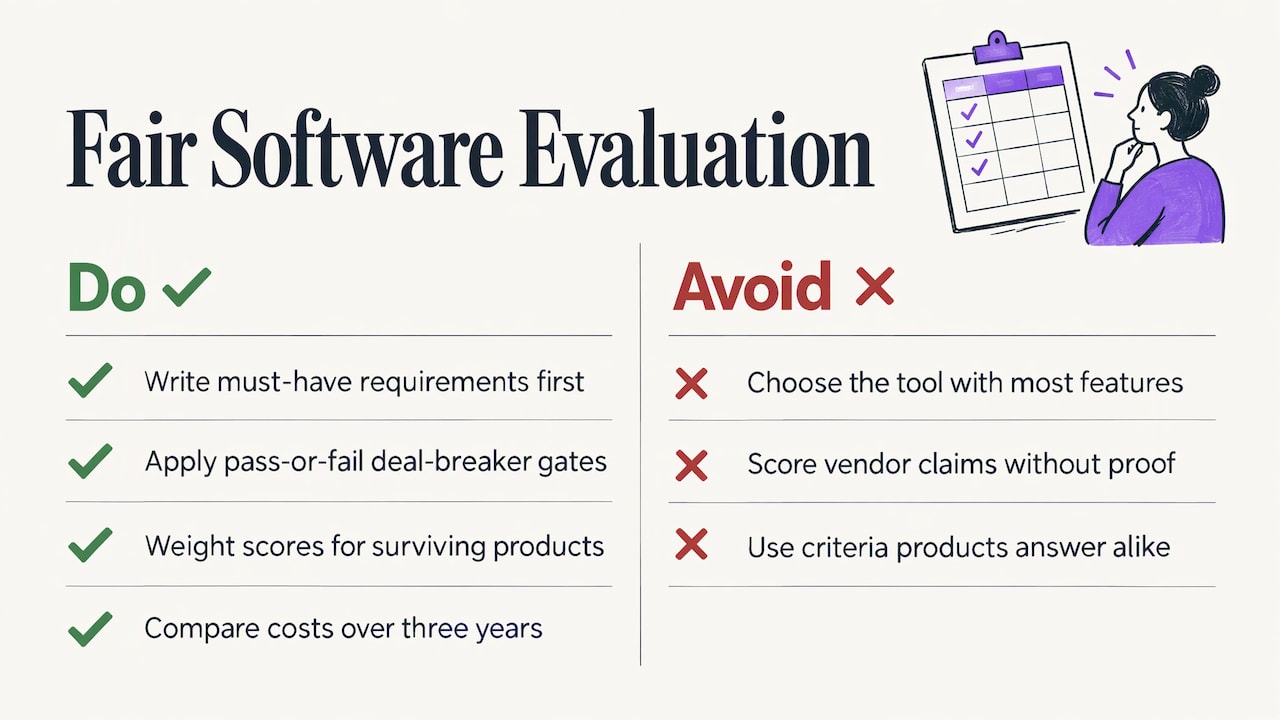
Demand evidence for every score. A claim on a vendor page earns a low score until you see proof, such as a report, a reference customer or your own trial.
Use selection criteria that separate products. BARC warns that criteria should expose meaningful product differences; if almost every product answers a question the same way, the question is not helping you decide. The same source reports that 72% of leading companies ran a competitive evaluation before buying software, against 41% of laggards in its 2026 analysis of 1,014 survey responses.
For a deeper walkthrough of scoring, see our guide to a software evaluation framework, and for the earlier stages of the same journey, our software selection process guide.
Where rankings fit into the process
The slowest part of procurement is usually building the longlist and shortlist from nothing. A category leaderboard shortens that: instead of starting from a blank search, you start from a ranked field and a stated set of criteria.
That only works if the ranking is trustworthy. VibeVoted’s rankings come from evaluations by 10 distinct leading AI models, scored on seven published criteria: clarity, need, differentiation, evidence, visual design and polish, trust, and sustainability. Our rankings rest on repeatable model evaluations across fixed criteria, not on user voting or popularity campaigns, and sponsor payments buy exposure only; they do not influence placement. The full approach is on the rules and methodology page.
Here is how that maps to the steps above:
| Procurement step | What a ranking adds |
|---|---|
| 4. Choose the route to market | A ranked field per category to build the longlist from |
| 5. Review security and trust | A trust score and model-written feedback to guide your questions |
| Shortlist comparison | Side-by-side leaderboards with the same seven criteria for every product |
| Requirements check | Per-product feedback on strengths and weaknesses to test against your needs |
Treat a ranking as the start of due diligence, not its end. It tells you where to look; your requirements, security review and contract terms still decide. You can see how an entry looks on a product page such as AWS Snowball or CompEat Analytics, and the weekly ranking shows how the leaderboard moves.
What a structured process saves
The cost of skipping structure shows up as waste. NPI Financial’s guide reports that within large enterprises 30% or more of SaaS spending goes to unused licences and features, and that 89% of the IT purchases it analyzed in 2022 were priced above fair market value. Its list of common mistakes includes renewing on autopilot, bypassing IT procurement, one-size-fits-all licensing and assuming contract terms are non-negotiable.
The fixes map straight onto the steps: a register stops silent renewals, a licence check prevents duplicates, and a scorecard gives you market evidence at the negotiating table. Also protect your calendar. Rushed decisions are among the costliest mistakes, so start early enough to allow suppliers time to respond and to run a proper trial.
Measure whether it worked
Procurement does not end at go-live. Before launch, assign each success metric an owner, a baseline, a target, a data source and a reporting cadence. HubSpot’s checklist recommends scheduling post-launch reviews against the original problem statement before renewal decisions are due, so any gap and remediation plan can inform the renewal.
This is why step 1 matters. If you wrote the problem as a testable sentence, the review is simple: did the four minutes per ticket go down? Pair that with licence utilization from your register, and the renew-or-replace decision largely makes itself.
For software makers: getting onto buyers’ shortlists
If you build software, procurement teams are your readers too, and your listing is often the first thing they see. A few preparations make a listing procurement-friendly:
- Describe the product in plain language with specific use cases and the industries it serves.
- State security certifications and data-handling facts where buyers can find them.
- Publish at least one clear pricing tier. Hidden pricing creates friction for procurement teams, according to Automatum.
- Keep evidence ready: case studies, documentation and references.
Our guide to SaaS directory submission walks through choosing where to list, submitting and tracking results, and our launch plan for first-time makers covers the surrounding work.
Get your product ranked on VibeVoted
VibeVoted is built for both sides of this process. Buyers use the leaderboards free. Makers sponsor a spot for entry and exposure: one voting session costs $25 one-off per credit, and each entry receives model-generated feedback from the evaluating AI models, which is useful input for your own positioning.

Because rankings are scored on the same seven criteria for every product, a strong entry gives buyers a clear, comparable signal. You can start from the sponsor page or browse the leaderboard to see how entries such as Devtoolry and Bluebox.ai are presented.
FAQ
What is the software procurement process?
It is the full sequence an organization follows to buy software: documenting the need, checking existing licences, evaluating suppliers, reviewing security and legal terms, ordering, setting up, and then managing renewals until retirement. Purchasing, the act of ordering and paying, is one step within it.
How is the software purchasing process different?
Purchasing is the transactional subset: issuing the order, processing the invoice and paying. Procurement also includes deciding what to buy, from whom, on what terms and for how long, plus managing the product afterward.
How long should software procurement take?
It depends on risk. A low-risk tool with no sensitive data can move through a simple quote and a light review, while a tool that holds customer data or connects to core systems needs security, privacy and legal review and, often, an RFP. Sorting requests by risk early lets each one take only the time it needs.
How do I submit my software product to a directory?
Prepare a plain-language description with specific use cases, your security certifications, at least one public pricing tier and supporting evidence, then choose directories where your buyers actually look. On VibeVoted, makers sponsor an entry for a ranked voting session at $25 one-off per credit; our directory submission guide covers choosing, submitting and tracking.
Sources
- What is the software procurement process, step by step? (eProcurement Toolkit)
- IT Procurement 101: Process, Steps & Benefits (Najar)
- Your Software Management Toolkit, SPP Rollout (Ohio State OTDI)
- Build versus buy: A strategic framework (Thoughtworks)
- Software Selection: Make Better Decisions (BARC)
- Guide to Smarter SaaS Procurement (NPI Financial)
- Software procurement checklist (HubSpot)
- Enterprise Cloud Marketplace Procurement Guide (Automatum)


